The short answer
Polymarket shows the fee on each trade, but it never adds them up. To see your total for the last 30 days, paste your Polymarket profile address (it starts with 0x) into the free check above. In 1–2 minutes you see every fee you paid, exact down to $0.01.
This works for polymarket.com. Polymarket US accounts are not on the blockchain, so they can't be checked this way.
Why Polymarket doesn't show your fee history
When you buy or sell, Polymarket shows the fee for that one trade. That is all. There is no monthly total, no "fees this month" line and no running sum on your profile.
The profit or loss on your profile already has the fees taken out. You see the result, but not how much of it went to fees.
One fee is small. Over a month of active betting, fees add up fast. For many traders they decide whether the month ends in profit or in a loss.
Three ways to check your Polymarket fees
1. Add up fees trade by trade
Open your trade history in Polymarket. Look at each trade, write down the fee and add them up in a spreadsheet.
This works if you made only a few trades. If you trade every day, it means hundreds of lines. It is slow, and one missed trade makes the total wrong.
2. Estimate with the formula
Polymarket uses one formula for every fee:
fee = shares × rate × price × (1 − price)
Price is in dollars: 50¢ = 0.50. The rate depends on the type of market:
| Market type | Rate |
|---|---|
| Crypto (including 5-minute markets) | 0.07 |
| Sports, economics, culture, weather, other | 0.05 |
| Politics, finance, tech, and markets on what someone will say | 0.04 |
| Geopolitics | 0 |
A small example. You buy 100 shares on a sports market (rate 0.05):
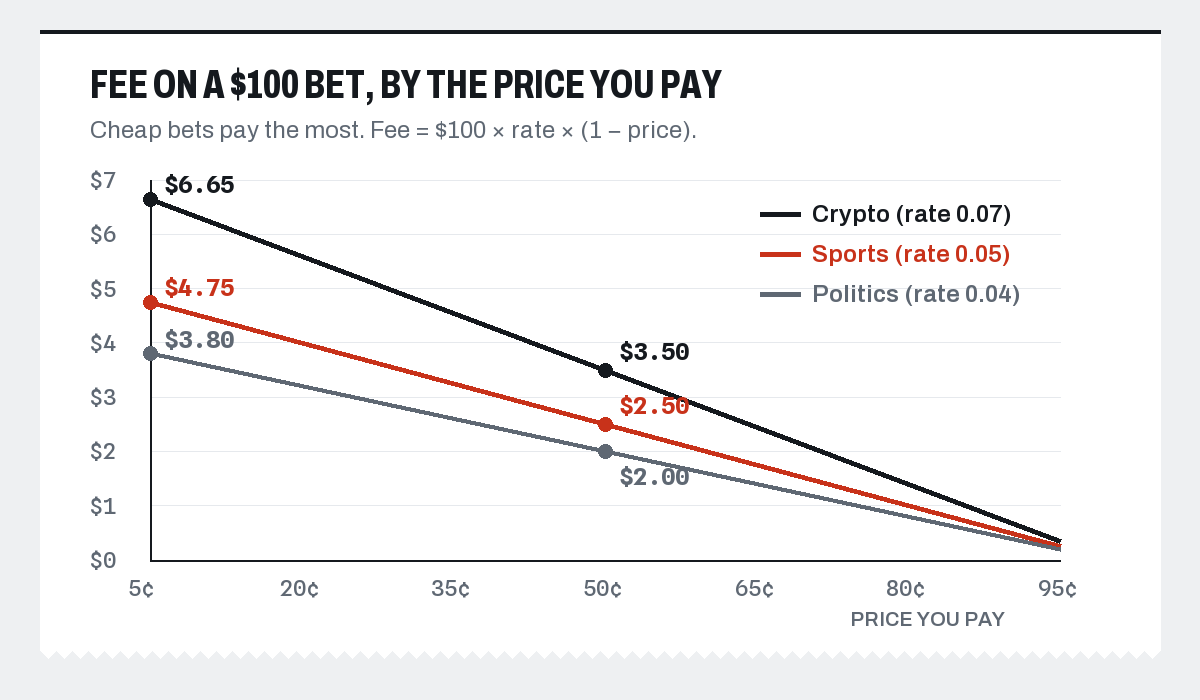
- At 50¢: 100 × 0.05 × 0.50 × 0.50 = $1.25. You spent $50, so the fee is 2.5% of your bet.
- At 80¢: 100 × 0.05 × 0.80 × 0.20 = $0.80. You spent $80, so the fee is 1% of your bet.
The same 100 shares on a crypto market at 50¢ cost $1.75 in fees.
This gives you a rough idea. But you still need the size, price and market type of every trade. And only trades that fill at once pay a fee (see "How to pay less" below). Full details are on our Polymarket fees page.
3. Paste your address into the free check
This is the fastest way, and the only exact one. Paste your Polymarket profile address on the fee check. We read every fee you paid from Polymarket's own public records. Nothing is estimated.
The free 30-day check shows:
- every fee you paid, added up;
- what Polymarket shows for your month;
- the same bets without fees;
- one line about what the fees did, for example "Fees turned +$215 into −$244".
No login and no keys. Your address is already public. Read how we count, step by step.
How to find your profile address
You need the address of your Polymarket profile. It starts with 0x, followed by 40 letters and digits.
- In Polymarket, tap your avatar.
- Go to Settings, then Profile.
- Copy the Address field.
Another way: open your profile page and copy the address from the link. It looks like …/profile/0x…
Don't use the address under Deposit → Transfer crypto. That address is only for adding money. It has no trades, so the check finds nothing.
Real examples: what fees did to two traders
Fees turned a profit into a loss
A trader on 5-minute crypto markets paid $459 in fees in 30 days. Polymarket showed −$244 for the month. Without fees, the same bets would have made +$215.
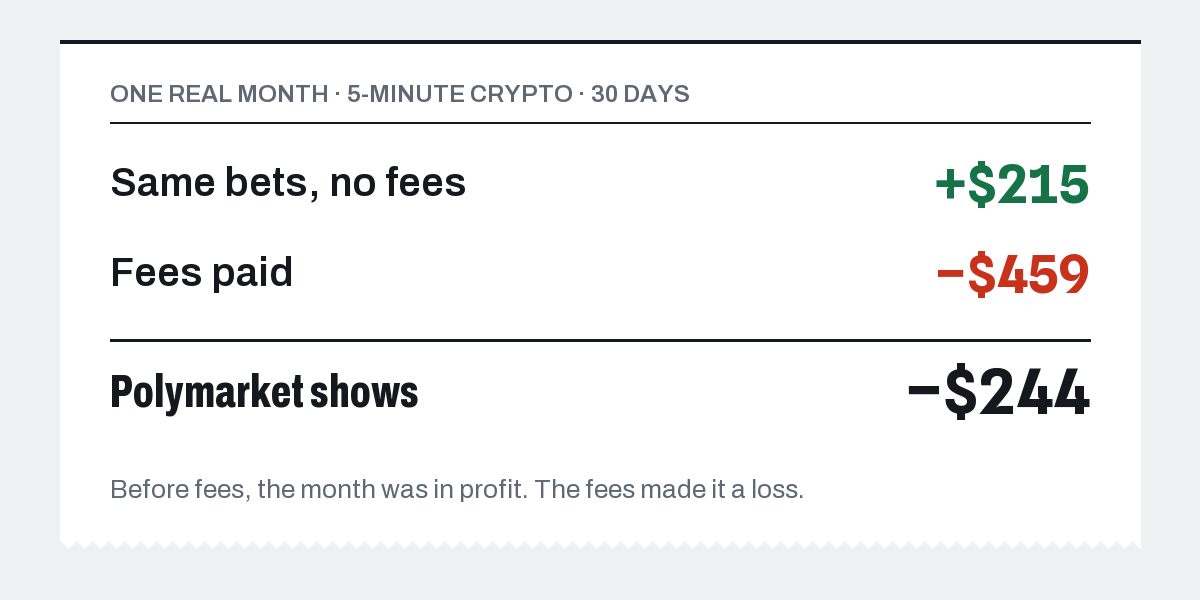
Before fees, the month was in profit. The fees made it a loss.
Fees ate most of the profit
A soccer trader made +$667 before fees. Fees took $476 of it. About 71% of the profit went to fees, and only $191 was left.
Want to see what a full breakdown looks like? See a real full report.
How to pay less
You pay a fee when your order fills at once: you click Buy or Sell at the price on the screen.
A limit order means you set your price and wait. If it waits and someone else buys from you or sells to you later, you pay no fee. You even get a share of the fees back: 15% on sports, 20% on crypto and 25% on other markets, paid daily when you have earned at least $1.
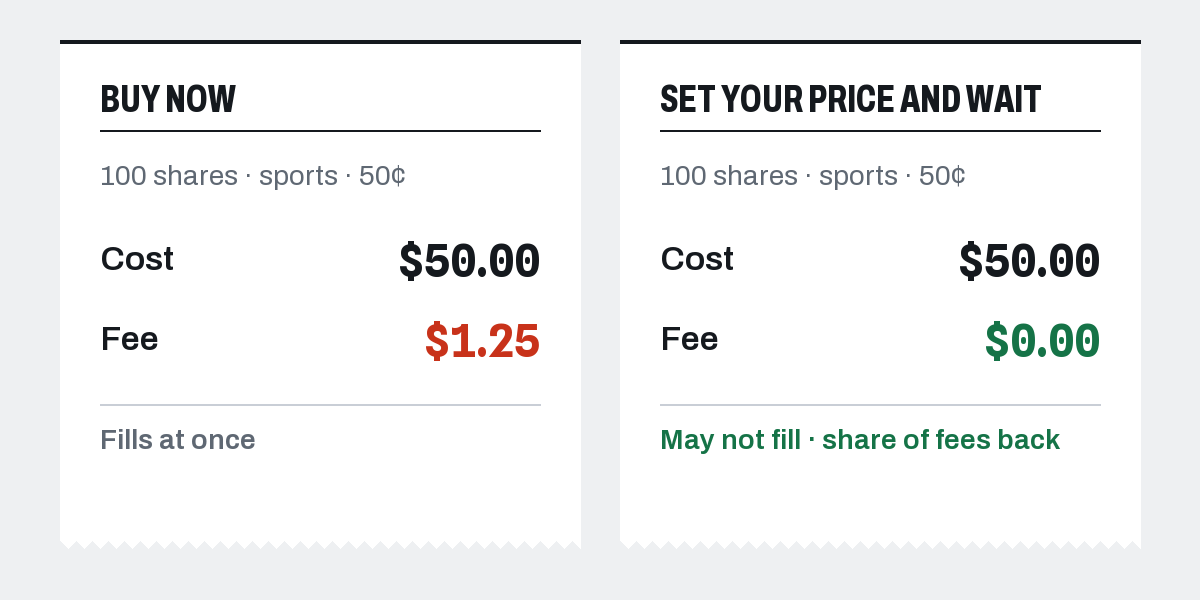
- Use limit orders. Set your price and wait. The order may not fill, but when it does, you pay nothing.
- Check the price. Cheap bets cost more in fees. For every $100 you bet, the fee is biggest at low prices and smallest near $1.
- Be careful with 5-minute markets. At 50¢ on crypto, each round costs 3.5% of your bet. Ten rounds a day at the same bet costs about a third of that bet in fees, every day.
Polymarket fee questions
How much have I paid in Polymarket fees?
Polymarket does not show a total. Paste your profile address into the free check to see your exact fees for the last 30 days.
Do limit orders pay fees on Polymarket?
Not if they wait for their price. A limit order that someone else fills later pays no fee and earns a share of the fees back. A limit order priced to fill at once pays the fee like any instant buy.
Why does the check find no trades?
You probably pasted the Deposit address. Use the address from Settings → Profile, or from your profile link.
Is the total complete for very active traders?
For very active wallets, public data shows only the latest trades. Then the real total may be higher: you paid at least this much.
See your own fee total
One paste, a minute or two. Paste your profile address on the fee check and get your free 30-day receipt. If you want more, the full report costs $19, refundable for 7 days. More guides: Polymarket fee guides.